Data Source Tables
Within the Altmetric BigQuery project altmetric, the primary dataset called data contains a listing of tables,
each table holds a specific entity type (such as research outputs, posts, attention sources, posts). These independent tables map onto the
data types available from within the Altmetric Explorer (research outputs and mention sources map directly; mentions are found in posts). The schema/layout of these tables reflect as much as possible that
of the Altmetric Explorer and the Altmetric Explorer API.
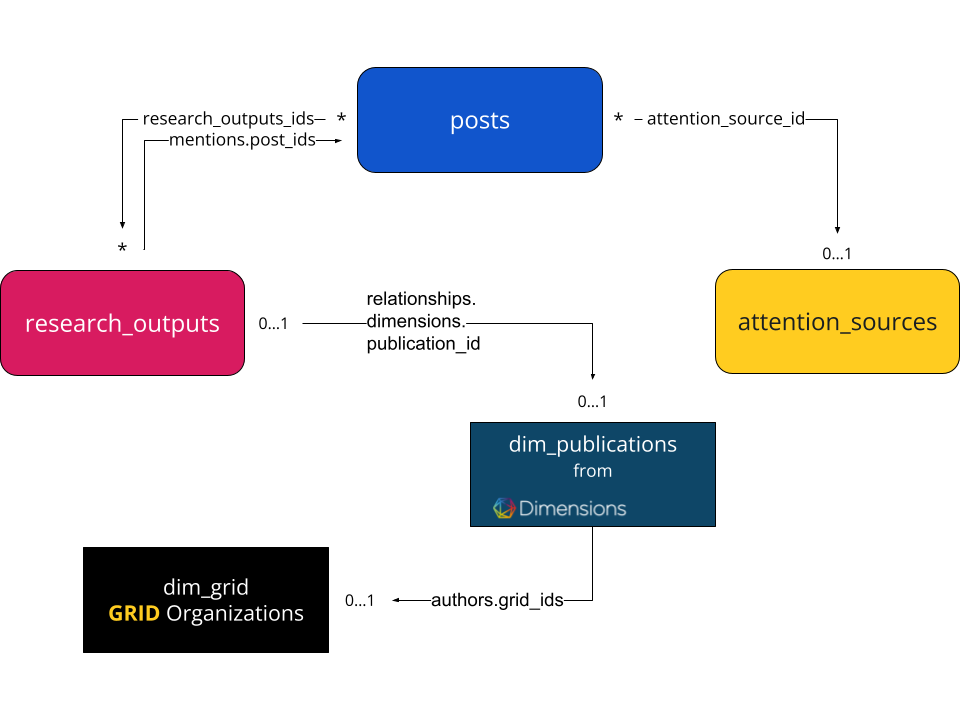
Each table can hold cross-references to entities contained within other tables (such as posts to research_outputs or research_outputs to dim_publications).
The tables available, depending on your subscription type, are detailed in the following links:
Update frequency
The frequency of data source updates are as detailed:
| Source | Update Frequency |
|---|---|
| Research Outputs | Daily incremental updates. |
| Posts | Daily incremental updates. |
| Attention Sources | Daily incremental updates. |
| Dimensions Publications | Daily incremental updates. |
| Dimensions GRID | As necessary with releases of new versions of GRID. |
Table partitions
The data source detail pages include information about which fields are used for partitioning and clustering. This information is extremely useful for creating more efficient queries (in both performance and cost considerations).
For BigQuery tables it is possible to increase the efficiency and reduce the cost of queries by partitioning the data. For each table, it is possible to nominate a specific column on which data is grouped around and then partitioned on. The cost of queries, if filtered on this partitioning field, can be drastically reduced if the query utilises the partitioning field within filtering 'WHERE' statements.
Taking the research_outputs data source table as an example, we partition on the year column. When performing a query, if we apply a filter to reduce the year of publication down to within the range 2010-2015 the cost of the query would reduce by approximately 70%. This is because BigQuery will only need to access the data present within the partitions 2010, 2011, 2012, 2013, 2014 and 2015 as opposed to accessing and reading data over the entire table (ie. all year ranges).
The documentation we provide for each data source lists all of the fields which are available and the type of data contained within the fields. On these pages we mark the column which is the primary partitioning key. We also indicate which fields which are used for clustering.
Google provides an excellent introduction to partitioned tables here: Introduction to partitioned tables.
See also
If you are using Google BI Engine, see also the FAQ Partitioning and Google BI Engine.
Cross type links overview
The figure below provides an overview of the main document sources and their respective cross links.